

Watch the tutorial in the hero video, then unlock the full step-by-step checklist below.
When Google Ads shows Missing Cart Data on conversions, your Merchant Center product IDs and your site’s tracking tag IDs don’t match. This guide walks through why that happens and two ways to fix it without losing historic performance data.
The Problem
What stops Cart Data reaching Google Ads?
When item IDs in Google Merchant Center (GMC) do not match item IDs received by the GTAG tag (Google Ads tracking tag), you’ll see a warning like the below in Google Ads.
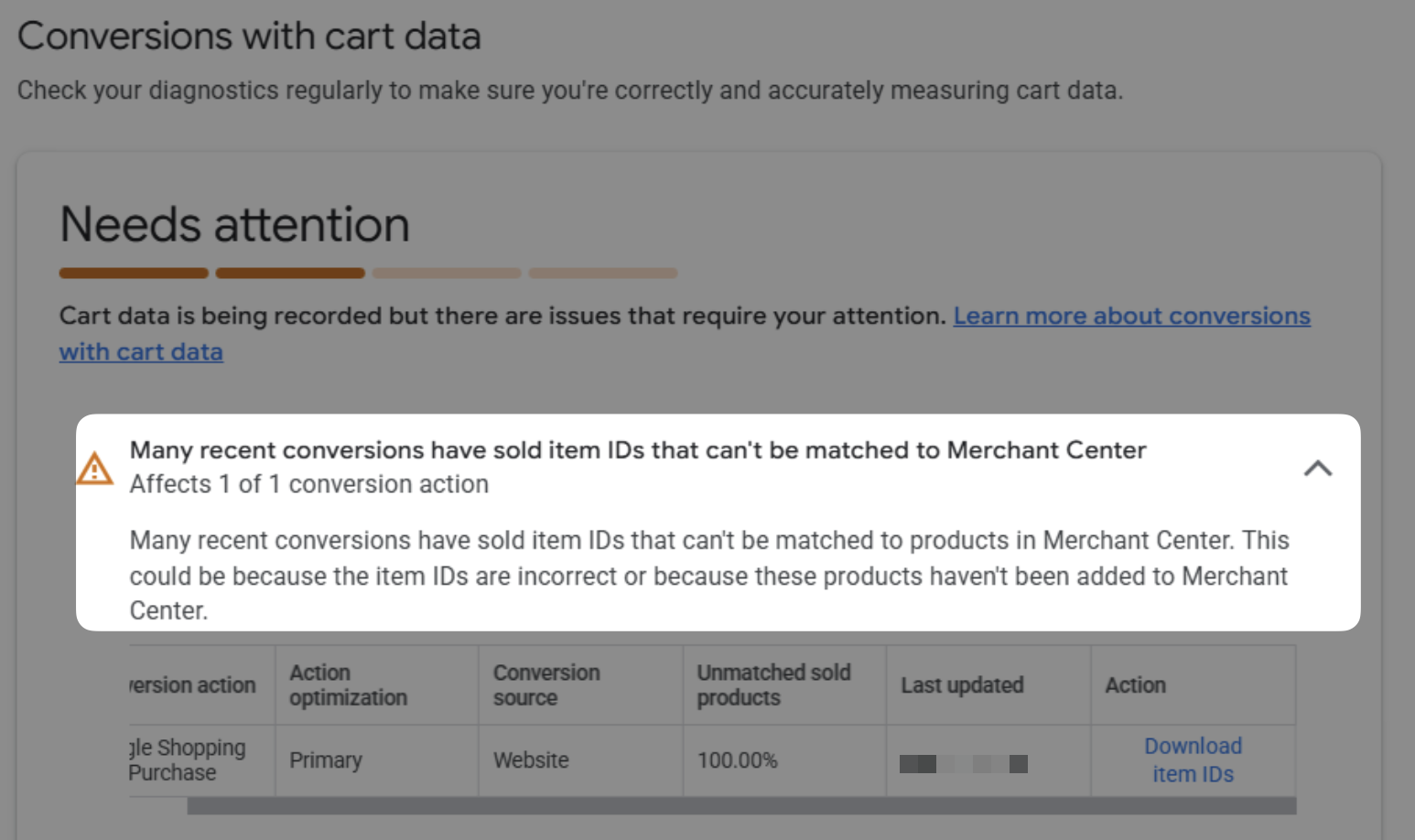
For example, if your GMC account uses this item ID format shopify_US_123456789_123456789 but your GTAG sees shopify_ZZ…, Cart Data cannot match item IDs to Google Ads conversion events like purchases and add-to-carts.
What is “Cart Data” and why add it?
A user can click one item in Shopping Ads, then purchase a different item on your website. Cart Data allows Google (and you) to see which items were clicked versus which items were purchased.
It’s important to know when this is happening so you can optimize the shopping ad products that get the most clicks, knowing that those products lead to sales of other products on your site.
Why you should not change item IDs in GMC
When you change an item ID in Google Merchant Center, Google sees it as a completely different product even if the title, description, URL, etc. remain unchanged. Even capitalization changes (shopify_US… to shopify_us…) are considered a changed ID.
When you change item IDs, GMC considers that a new item. All historic clicks and conversions data is lost (you can restore the old item ID to get the data back, but only if you saved the old item ID).
The Solution
There are two methods you can use. Option 1 is simpler and requires no maintenance when done. Option 1 is the right choice for most stores.
Option 1: change item IDs gradually
It’s a bad idea to switch item IDs all at once. However, you can switch them slowly over time which reduces or eliminates the impact on Google Ads from changing item IDs.
We use DataFeedWatch at my company. The same principle applies without it.
Step-by-step implementation process
- Step 1: pause the channels you’re working on
- Step 2: make a “New ID” master field in DFW (example:
shopify_ZZ…) and “Old ID” master field (example:shopify_US…) - Step 3: make the use new item ID, if is in list rule (see example screenshot below)
- Sample G-Sheet for the “if is in list” DFW rule: [Sample] Swap Item IDs
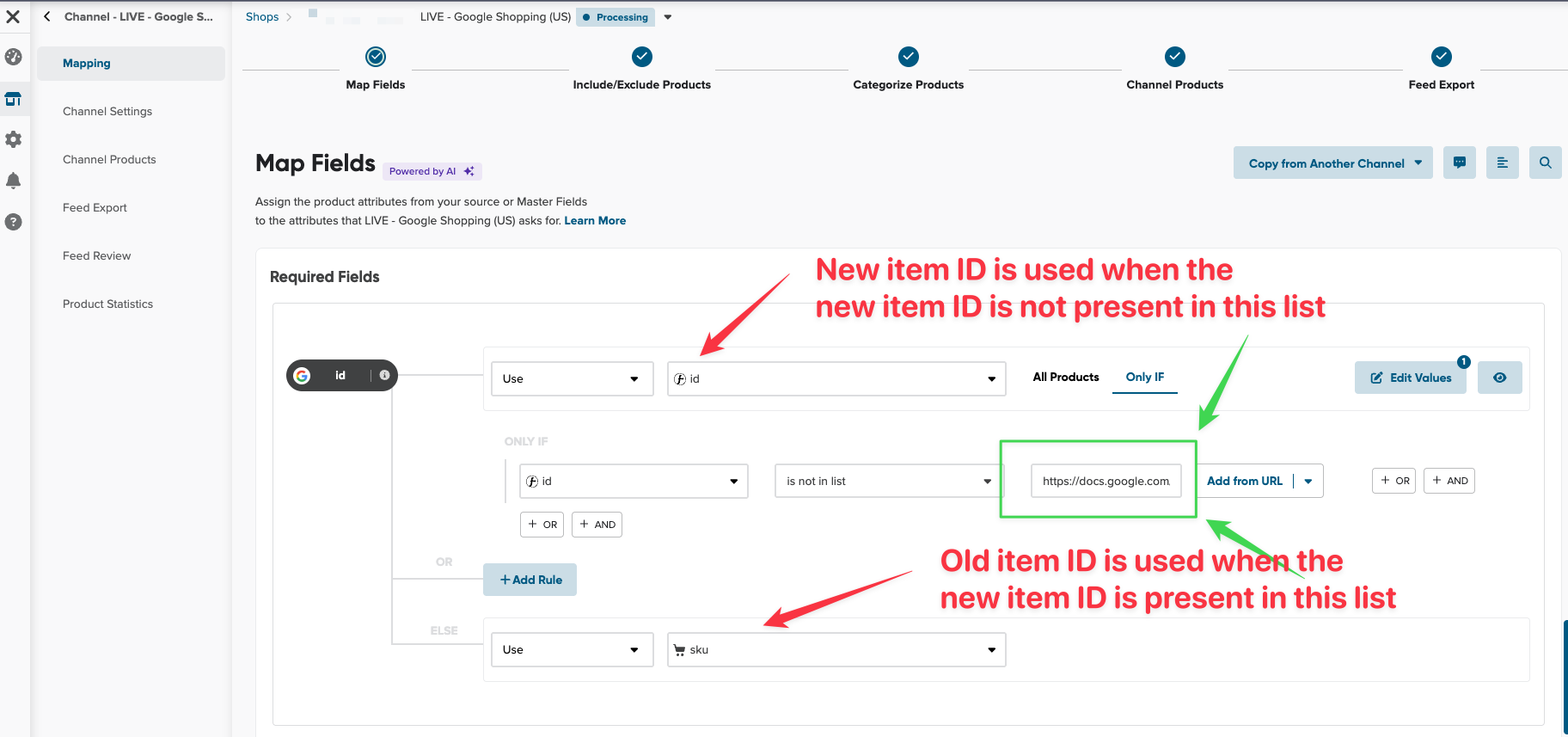
- Step 4: download item IDs by revenue from last 90 days into your Swap Item IDs sheet
- Step 5: test deleting some item IDs from your Swap Item IDs sheet and preview results
- Step 6: enable the channel once you’re done with Steps 1 to 5
- Step 7: start deleting old IDs out of the list on a weekly cadence
- Step 8: continue deleting more item IDs from the Swap Item IDs sheet till you’re done
I recommend deleting ~10–15% of item IDs per week till you reach the last 20% items. For the last 20% (top sellers), delete fewer item IDs per week till done.
11-week example timeline
- 1–15% of low-selling items switched to new item ID format
- 16–30%
- 30–45%
- 45–60%
- 60–75%
- 75–80%
- 80–85%
- 85–90%
- 90–95%
- 95–98%
- 98–100% — last top-selling items switched
Option 2: send different item IDs in the Google Tag
This version is complicated and Elevar has already posted an excellent guide. See the Elevar guide. You must maintain those tags going forward. Option 1 is the best choice for most people.
How to read cross-sell reports in Google Ads
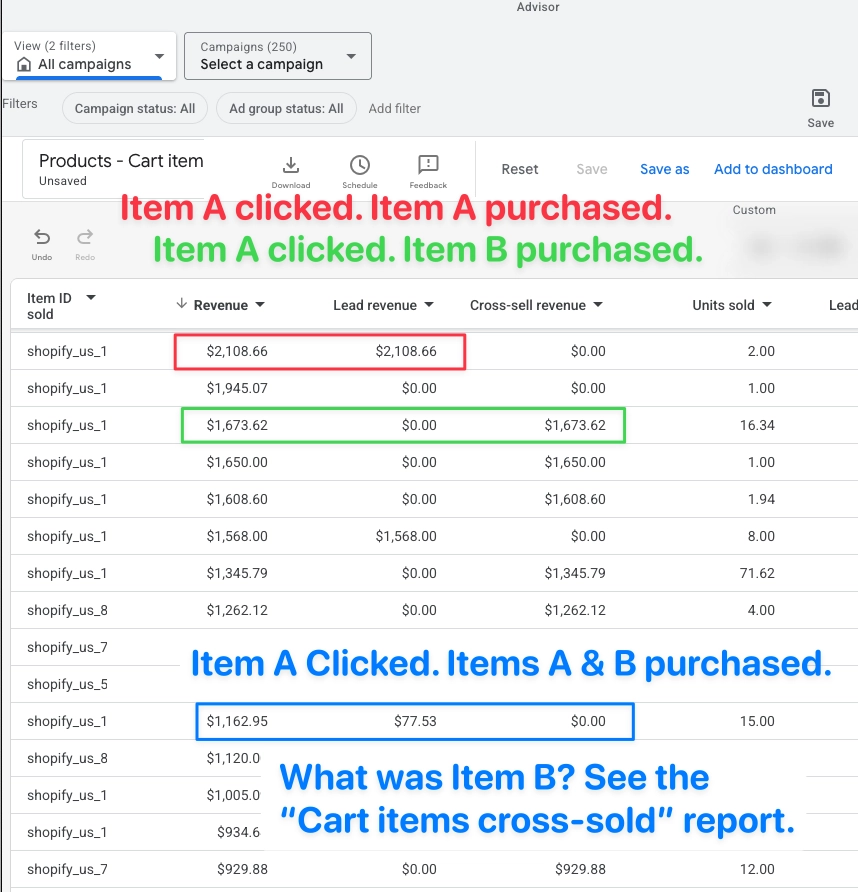
Cross-sell reports take time to understand. Here’s how to read the “Products – Cart Item” report.
- Product ad: the item in shopping ad results that was clicked.
- Revenue column: total sales attributed to a click on the product ad.
- Lead revenue column: revenue when the same product was purchased.
- Cross-sell revenue column: revenue when a different product was purchased.
Sources cited
- About Conversions With Cart Data
- Set up and test reporting with conversions with cart data
- How to Change Product IDs from SKU to Shopify IDs (Elevar)
Related: 2026 Google Merchant Center Full Setup · 2026 Conversion Tracking Guide